Import
Koinè allows you to import files created in word processing or presentation software, such as PowerPoint and Word.
When your surtitles are available in a compatible format, importing them provides a quick way to get started on your project.
Supported file formats
The following file formats are supported:
Text Documents (*.txt)
Rich Text Format (*.rtf)
Microsoft Word Documents (OpenXML) (*.docx)
Microsoft PowerPoint Presentations (OpenXML) (*.pptx)
Note
Files saved in older Microsoft Office formats, namely Microsoft Word 97-2003 (*.doc) and Microsoft PowerPoint 97-2003 (*.ppt), must be converted before they can be imported into Koinè. To convert a file, simply open it in Microsoft Office and save it as a Word Document (*.docx) or PowerPoint Presentation (*.pptx).
File formatting
Formatting text documents
When a text document is imported, each paragraph separated by two or more line breaks is converted into a card. An empty card can be inserted by adding a paragraph containing only the # character.
Formatting PowerPoint presentations
When importing a PowerPoint presentation, each text box is converted into a card. These cards will be assembled into a single track.
Import a file
To import a file, choose File > Import. In the dialog, select the file to import, and click OK.
If you have selected a Word or Rich Text Format document, a second dialog will appear offering you import options. These options are described in the next section.
Once the options are selected, the file is converted into cards, which are inserted into a new track added at the end of your project.
Import options
When a Word or Rich Text Format document is imported, the following dialog appears.
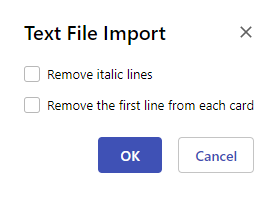
Remove italic lines
When the Remove italic lines option is enabled, lines of text that are entirely in italics are ignored during import. This option can be used to remove stage directions from the text.
Remove the first line from each card
When the Remove the first line from each card option is enabled, the first line of text from each card is removed during import. Cards that originally had only one line of text are kept as is. This option can be used to remove character names that appear in dialogues.